
Background
Internet Shortcut files, which have the .URL file extension, are used to create desktop shortcuts to Internet sites. Windows is also configured by default to hide .URL file extensions by way of having a NeverShowExt registry value in HKCU\InternetShortcut. As such, a file with the name prize.pdf.url will appear in Windows Explorer as prize.pdf, regardless of whether Explorer is configured to show file name extensions or not. In this post we will describe how .URL files are being abused in the wild, and how you can protect yourself against such attacks.
A vulnerability is discovered and fixed
In June 2025, Microsoft released CVE-2025-33053 to describe a remote code execution vulnerability in Internet Short files that was being exploited in the wild. While the Microsoft advisory is lacking details about the actual vulnerability the Check Point Research post about CVE-2025-33053 makes it clear that the vulnerability is triggered when a .URL file specifies a WorkingDirectory directive that points to a remote WebDAV server. When the .URL file is clicked on, the local executable specified in the URL parameter of the .URL file is launched, but with a working directory that resides on a remote WebDAV server. When this happens, the program looks in the current working directory for DLL and EXE files to use. This allows the remote server the ability to provide EXE or DLL files to be loaded or executed by the legitimate local program. Microsoft fixed this with the updates for CVE-2025-33053, which no longer applies the WorkingDirectory directive when opening Internet Shortcut files.
While CVE-2025-33053 does require user interaction to be exploited, the dialog presented to the user does not have sufficient information for the user to make an informed security decision.
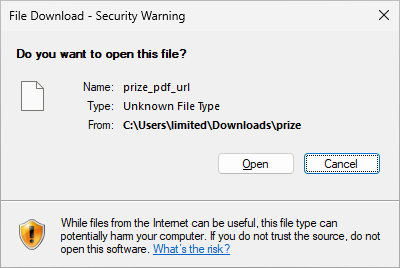
Specifically, the problems with this dialog are:
- The Name: field is incorrect, as the file name in this case is prize.pdf.url. It is unclear why underscore characters are used.
- The Type: field provides no useful information at all. The URL field in the .URL file specifies the exact target of the Internet Shortcut, which is an executable file. But Windows chooses to say that it’s Unknown File Type.
- The From: field does indeed correctly convey the directory that the .URL file lives in, but this is of no use.
It’s commonly known that users should not be relied on to make security decisions. In this case, Windows leaves the security decision up to the user, but it also fails to provide any information that can be used to make an educated decision.
A bypass to CVE-2025-33053 is discovered
In investigating the Internet Shortcut file format, Tharros Labs discovered that a bypass for CVE-2025-33053 is quite trivial. Rather than running a legitimate local executable while specifying a remote WorkingDirectory parameter, it is also possible to specify a remote executable file in the URL parameter of an Internet Shortcut file. Since the impact is exactly the same as CVE-2025-33053, which received a security update from Microsoft, we reported this variant to Microsoft’s MSRC team.
MSRC response
After nearly two months, we got a response from MSRC that states that this issue does not meet MSRC’s current bar for immediate servicing. Given that CVE-2025-33053 did meet MSRC’s bar for immediate servicing, this is surprising. The impact is exactly the same as CVE-2025-33053:
Remote code execution that bypasses Windows protections such as Smart Screen.
Minor tweak to language in Internet Shortcuts page
At the time that the vulnerability was reported to Microsoft, the Internet Shortcuts page said:
When the user clicks the icon, the browser is launched and displays the site associated with the shortcut.
Only after some prodding did Microsoft update the language in the page to:
When the user clicks the icon, the URL path is opened by the handler application, typically the user’s default web browser.
The page still leads with the incorrect statement of:
The Internet shortcut object is used to create desktop shortcuts to Internet sites.
“Internet sites” are things that you view with a web browser. If an Internet Shortcut can point to an EXE on a remote WebDAV server, this cannot be captured as “Internet sites.” Using this language is deceptive to users.
The exploit in action
Here is a screen recording of what can happen when a user clicks on a .URL file that they downloaded from the internet.
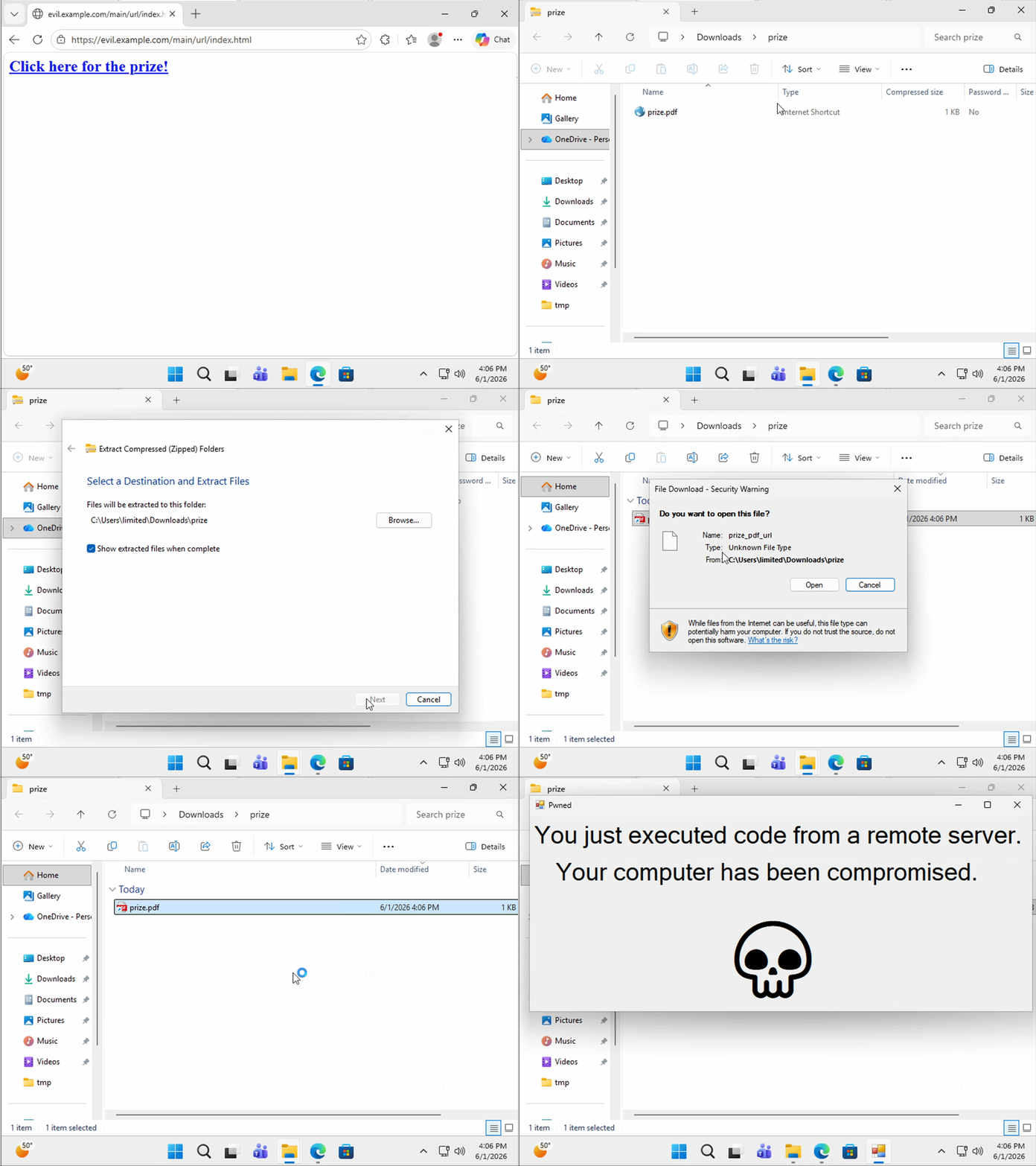
It is important to note that this downloaded executable that is run is not scanned with Smart Screen, which is a Windows capability for confirming the legitimacy of downloaded applications.
Exploited in the wild
Attackers have been using this vulnerability in the wild. For example, here is an Internet Shortcut file on VirusTotal that specifies a remote EXE on an IP address that is known to be malicious. The detection rate at the time of this writing is at zero.

As with many security issues, this is a clear example of how you cannot merely rely on antivirus products for protection.
Consequences of not having a CVE ID
Because Microsoft is a CVE Numbering Authority (CNA), Microsoft decides which vulnerabilities receive CVE records. Because they have decided the URL variant of the Internet Shortcut attack is not worthy of a CVE, it is likely that this vulnerability will never have a CVE. The rules for CVE ID assignment do allow for the ability of a CNA-LR or other CNA with an appropriate scope to assign a CVE to a vulnerability where the CNA with the most appropriate scope has refused to assign a CVE. However, this situation is not very common. Usually when the CNA with the most appropriate scope refuses to assign a CVE, the vulnerability does not get a CVE ID.
The situation of a vulnerability not having a CVE ID has multiple consequences. Including:
- The infosec community lacks a mechanism for knowing that they are all referring to the same vulnerability. This goal of CVE is clear in the CVE overview. Specifically:
Information technology and cybersecurity professionals use CVE Records to ensure they are discussing the same issue, and to coordinate their efforts to prioritize and address the vulnerabilities.
- Vulnerabilities that do not have a CVE will never end up in the CISA Known Exploited Vulnerabilities Catalog (KEV). The How to use the KEV catalog documentation shows that Criteria #1 for inclusion in the KEV is that the vulnerability has an assigned CVE ID. Vulnerabilities without CVE IDs will not be added to the KEV.
The vulnerability described in this post both lacks an identifier that allows the infosec community to refer to it, and it will also not be added to the KEV, despite it being actively exploited in the wild.
Detection of potentially malicious .URL files with yara
This yara rule should detect most .URL files that may exploit the CVE-2025-33053 bypass outlined in this article:
rule webdav_url_target
{
  meta:
    author = "Will Dormann"
    description = "CVE-2025-33053 bypass"
    target_entity = "file"
  strings:
    $a = /^[ \t]*\[[ \t]*InternetShortcut[ \t]*\]/i
    $a_w = "[InternetShortcut]" wide nocase

    $b = /URL[ \t]*=[ \t]*\\\\/i
    $b_w = "URL=\\\\" wide nocase

    $c = /URL[ \t]*=[ \t]*\\\//i
    $c_w = "URL=\\/" wide nocase

    $d1 = /URL[ \t]*=[ \t]*file:\/\/[a-zA-Z]{2,}[^:\/\\\r\n]*[\/\\]/i
    $d1_w = "URL=file://" wide nocase

    $d2 = /URL[ \t]*=[ \t]*file:\\\/[a-zA-Z]{2,}[^:\/\\\r\n]*[\/\\]/i
    $d2_w = "URL=file:\\/" wide nocase

    $d3 = /URL[ \t]*=[ \t]*file:\\\\[a-zA-Z]{2,}[^:\/\\\r\n]*[\/\\]/i
    $d3_w = "URL=file:\\\\" wide nocase

    $e1 = /URL[ \t]*=[ \t]*file:\/\/[0-9][0-9.]*[\/\\]/i
    $e2 = /URL[ \t]*=[ \t]*file:\\\/[0-9][0-9.]*[\/\\]/i
    $e3 = /URL[ \t]*=[ \t]*file:\\\\[0-9][0-9.]*[\/\\]/i

    $f  = /URL[ \t]*=[ \t]*file:[\/\\]{4}/i
    $f_w = "URL=file:////" wide nocase

  condition:
    ($a or $a_w at 2) and
    ($b or $c or $d1 or $d2 or $d3 or $e1 or $e2 or $e3 or $f or
     $b_w or $c_w or $d1_w or $d2_w or $d3_w or $f_w)
}
Protecting against Internet Shortcut .URL file attacks
Windows can be configured to disassociate .URL files with the Internet Shortcut handler. For each user that you wish to protect, this can be accomplished with the following commands:
reg add HKCU\Software\Classes\.url /ve /d DisabledURLFile /f
reg add HKCU\Software\Classes\DisabledURLFile /ve /d "Disabled Internet Shortcut" /f
reg add HKCU\Software\Classes\DisabledURLFile\shell\open\command /ve /d "notepad.exe \"%1\"" /f
reg delete HKCU\Software\Microsoft\Windows\CurrentVersion\Explorer\FileExts\.url /f
With this change, the file extension of .url will no longer be hidden. And this is the behavior upon clicking a .URL file:
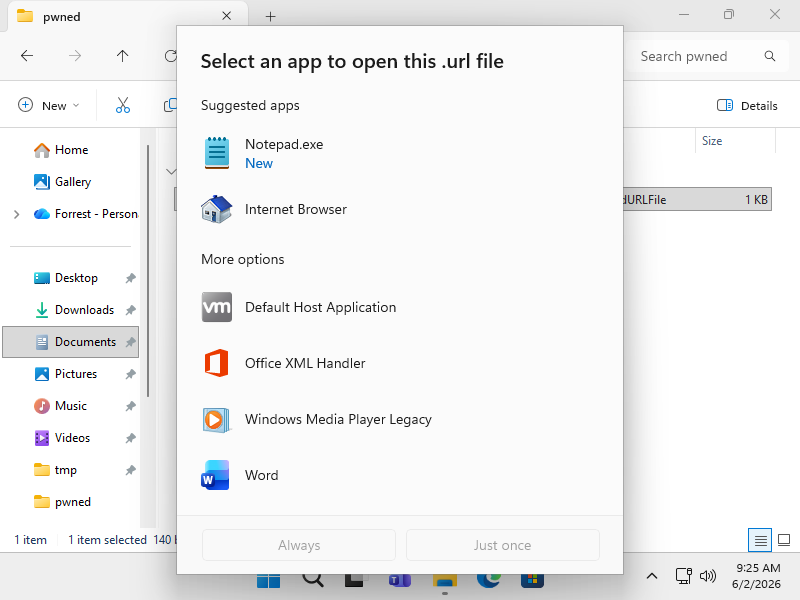
If for whatever reason you wish to undo this change, this can be accomplished with the following commands:
reg delete HKCU\Software\Classes\.url /f
reg delete HKCU\Software\Classes\DisabledURLFile /f
reg delete HKCU\Software\Microsoft\Windows\CurrentVersion\Explorer\FileExts\.url /f
Timeline
2025-06-13: CVE-2025-33053 bypass reported to MSRC
2025-06-16: Misleading language in Internet Shortcuts documentation pointed out to MSRC
2025-07-10: Example of bypass being used in the wild shared with MSRC
2025-08-20: MSRC states that the vulnerability doesn’t meet their bar for immediate servicing
2025-08-26: Concern about misleading language in Internet Shortcuts documenation brought up again
2025-09-02: MSRC states that they made a documentation update earlier this year
Conclusion
Windows Internet Shortcut .URL files are well known to be abusable by attackers, and attacks are happening in the wild. The WorkingDir variant of the attack was deemed by MSRC to be worthy of a fix in the form of CVE-2025-33053, but the URL variant of the attack was determined to not be worthy of fixing as a security issue. Conceptually this makes no sense, as the attack flows and outcomes are identical. However, we do not need to pontificate about the inner workings of MSRC. Simply unmapping the handler for .URL files as outlined above can eliminate this entire class of attacks. As with any system change, be sure to investigate whether you have any workflows that relies on the ability to click on .URL files before making this change.