
Background
In the glory days of Microsoft security bulletins, Microsoft Security Response Center (MSRC) produced very detailed publications. For example, consider the MS08-067 security bulletin, which described the vulnerability that allowed the Conficker worm to exist. This publication contains information about the vulnerability, what was fixed, mitigating factors, workarounds, information about update deployment, and a FAQ section.
Compare this to a recent MSRC publication for a BitLocker bypass: CVE-2026-50507. This updated style of publication from MSRC contains significantly less information compared to publications of the past. Essentially the new publications contain a sentence about the impact of the vulnerability (as opposed to what the vulnerability is), a CVSS score, a CWE ID, and some information about whether the vulnerability was publicly discosed, exploited in the wild, and likely to be exploited.
In this post, we will look at the consequences of such changes to these publications. Specifically in the scope of some recently disclosed BitLocker bypasses in Windows.
YellowKey
On May 12, 2026, security researcher Nightmare Eclipse released a tool to perform a TPM-only BitLocker bypass called YellowKey. Note that Microsoft has since removed the GitHub account for the researcher, but the code is available in other places.
How YellowKey Works
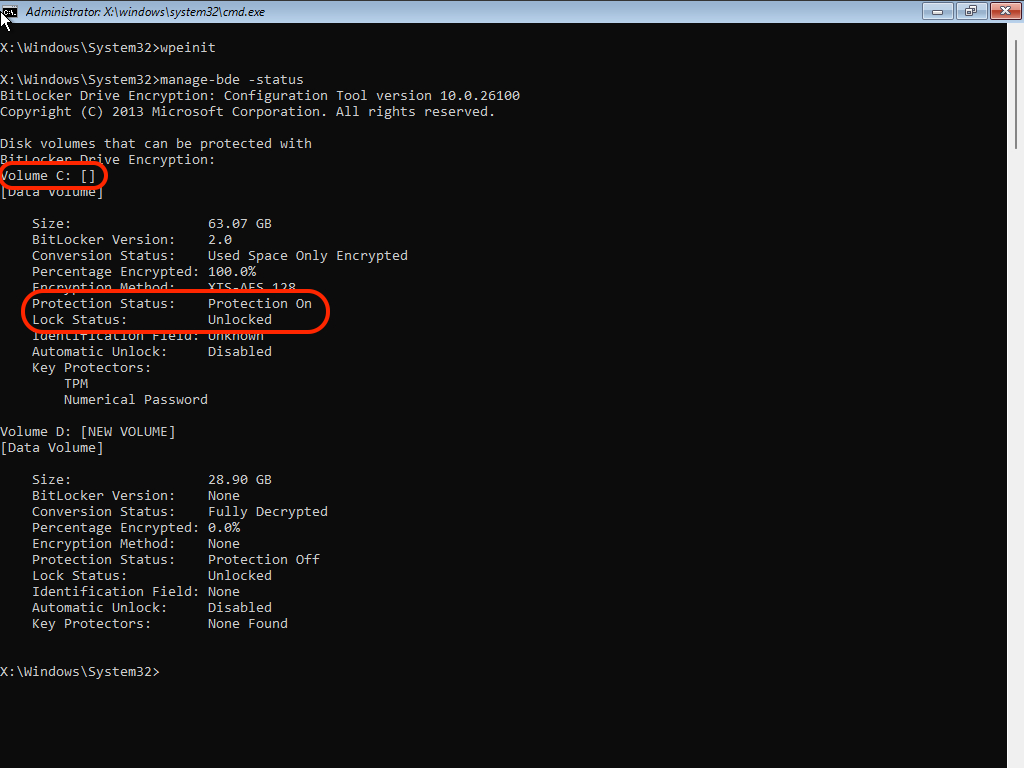
The mechanism of YellowKey is relatively straightforward. When Windows is rebooted into the recovery environment (WinRE), it will scan USB-attached disks for a Transactional NTFS log files in the \System Volume Information\FsTx\ directory. If found, WinRE will replay the transaction and modify the NTFS filesystems accordingly. In the case of YellowKey, the crafted Transactional NTFS files cause the X:\Windows\System32\winpeshl.ini file to be deleted. The consequence of this file being missing is that rather than displaying the normal WinRE menu system, a CMD.EXE prompt is opened at the point where the BitLocker-protected disk is available in an unlocked state. Here is an example successful YellowKey exploit on a Windows 11 25H2 system:
About TPM-only BitLocker
TPM-only BitLocker has known to be less secure than TPM+PIN for years. For example, Pulse Security published a TPM-only BitLocker bypass that involved sniffing the BitLocker key off of the LPC bus. Obviously, this sort of attack requires a high amount of technical experience and access to the insides of the target machine. YellowKey makes the same sort of attack possible with physical access to the machine and a USB drive.
If a computer boots automatically into Windows and automatically decrypts the drive, then what is the point of getting a BitLocker bypass? Two scenarios come into mind:
- You have a roommate that has a computer that you don’t know the credentials for.
- You have a company-provided computer that you are not an administrator of.
In the days before BitLocker, an attacker could gain admin access by simply booting from alternate media such as a USB disk and modifying the SAM file to create or modify a local admin account. Even with TPM-only BitLocker, this attack was thwarted, as booting from alternate media would not result in automatic unlocking of the OS disk.
YellowKey brings us back to a world where such attacks are possible again. And in the case of scenario 2 above, even TPM+PIN can be bypassed to get a SYSTEM-privileged command prompt, as you know the PIN.
Bitskrieg
On June 5, 2026, security researcher Jonas L published a BitLocker bypass called bitskrieg.
How Bitskrieg Works
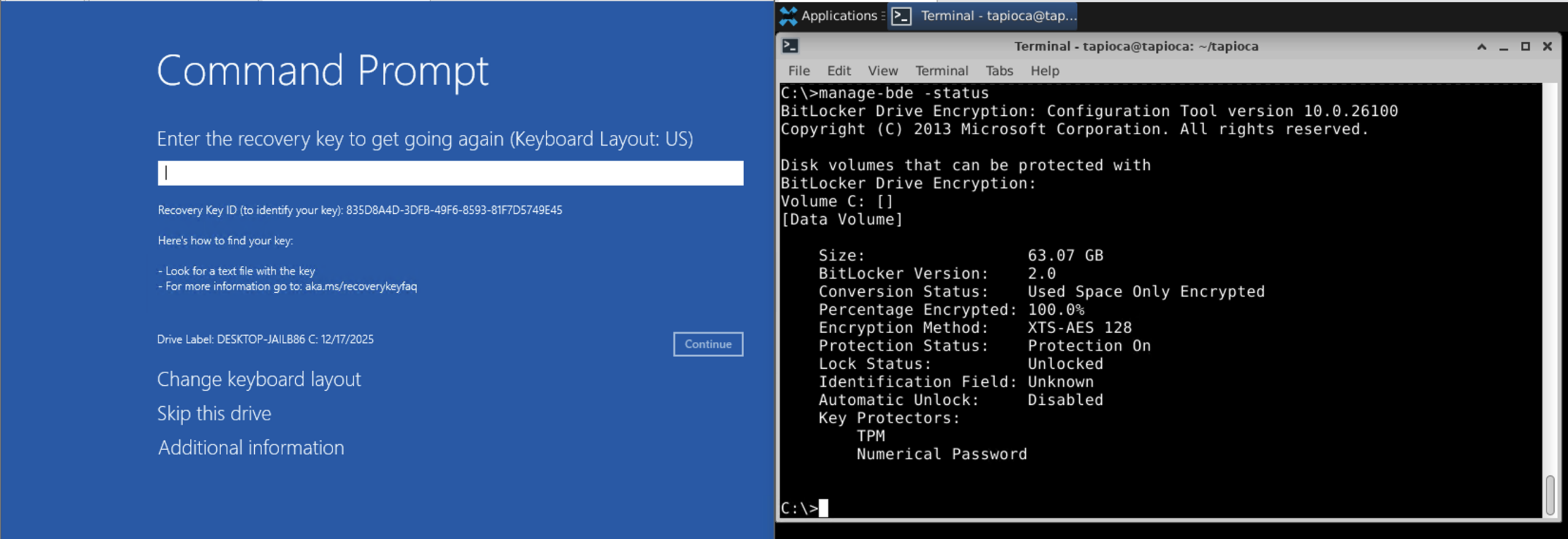
Unlike YellowKey, which uses Transactional NTFS, bitskrieg utilizes the Emergency Management Services (EMS) feature of Windows. This feature allows for the use of a serial port to access low-level Windows operations. On systems that allow WinRE to immediately drop to a command prompt even if BitLocker is enabled, EMS can be enabled for the WinRE environment, which means that a system connected to the target system’s serial port can access the unlocked system disk. Here is a screenshot of the two system side by side. The target system is on the left, and the attacker’s serial-connected system on the right.
For systems that do not have built-in physical serial ports, it is reported that USB-to-serial adapters can work.
Microsoft’s June Updates
In the June 2026 updates from Microsoft, not one but three BitLocker bypass fixes have been released:
- CVE-2026-45655 (CWE-693: Protection Mechanism Failure)
- CVE-2026-45658 (CWE-284: Improper Access Control)
- CVE-2026-50507 (CWE-306: Missing Authentication for Critical Function)
The only difference between these CVE IDs is the associated CWE ID. As a defender, it would be useful to know which of these might be YellowKey or bitskrieg. Specifically, this is a situation where there are public exploits, and it would be useful to know if the June updates protect users against these exploits.
Microsoft’s Handling of CVE
As mentioned in the background section at the top, Microsoft used to refer to their updates using a numbered system like MS08-067, where the “08” captured that it was from the year 2008, and the “067” captured that it was the 67th security update of the year. However, in 2017, Microsoft stopped publishing these security bulletins, and switched to security update publications identified by the associated CVE ID.
The problem is that it appears that Microsoft has not switched the mindset of the ID being for the update that Microsoft has released. As such, it appears that Microsoft considers the CVE identifier as the identifier for the update that Microsoft has released. This is a clear violation of CVE CNA rules:
4.2.7 CNAs SHOULD assign CVE IDs to Vulnerabilities, not Fixes for Vulnerabilities. CNAs SHOULD assign CVE IDs whether or not a Fix is available.
The expected use for the CVE system is to have a unique identifier for each vulnerability, and that CVE ID can be used to cross reference things related to the vulnerability, so that the infosec community knows that they are talking about the same thing.
Take CVE-2026-50507, for example. With the CVE entry for CVE-2026-50507, Microsoft is the CVE Numbering Authority (CNA). This means that Microsoft created the CVE entry. The only reference for CVE-2026-50507 is the Microsoft publication for the vulnerability: https://msrc.microsoft.com/update-guide/vulnerability/CVE-2026-50507
Is CVE-2026-50507 YellowKey? There is only one hint that it might be, as the Microsoft publication for CVE-2026-50507 indicates “Publicly disclosed: Yes.” However, we shouldn’t have to make guesses as to what Microsoft updates are for what already-publicly-disclosed vulnerabilities. Are any of the CVEs for bitskrieg? Given the timing of bitskrieg’s public release, it is unlikely that any of them were specifically intended to address it.
Testing Microsoft’s June Updates Against YellowKey and Bitskrieg
We shouldn’t have to wonder whether YellowKey and biskrieg are addressed in the updates released in June. For all three BitLocker Bypasses, Microsoft states that the fixes are contained within the June cumulative update for Windows. We can test this by taking a stock Windows system installed from the ISO and installing only June’s cumulative update. The updates, being cumulative, should mean that if the June update is installed, we should be protected. In our case, we tested a Windows 11 25H2 system with the KB5094126 update installed.
YellowKey and Win11 25H2 with June’s Update Installed
Here is a screen recording of attempting YellowKey against a Windows 11 25H2 system with KB5094126 (the June Windows update) installed.
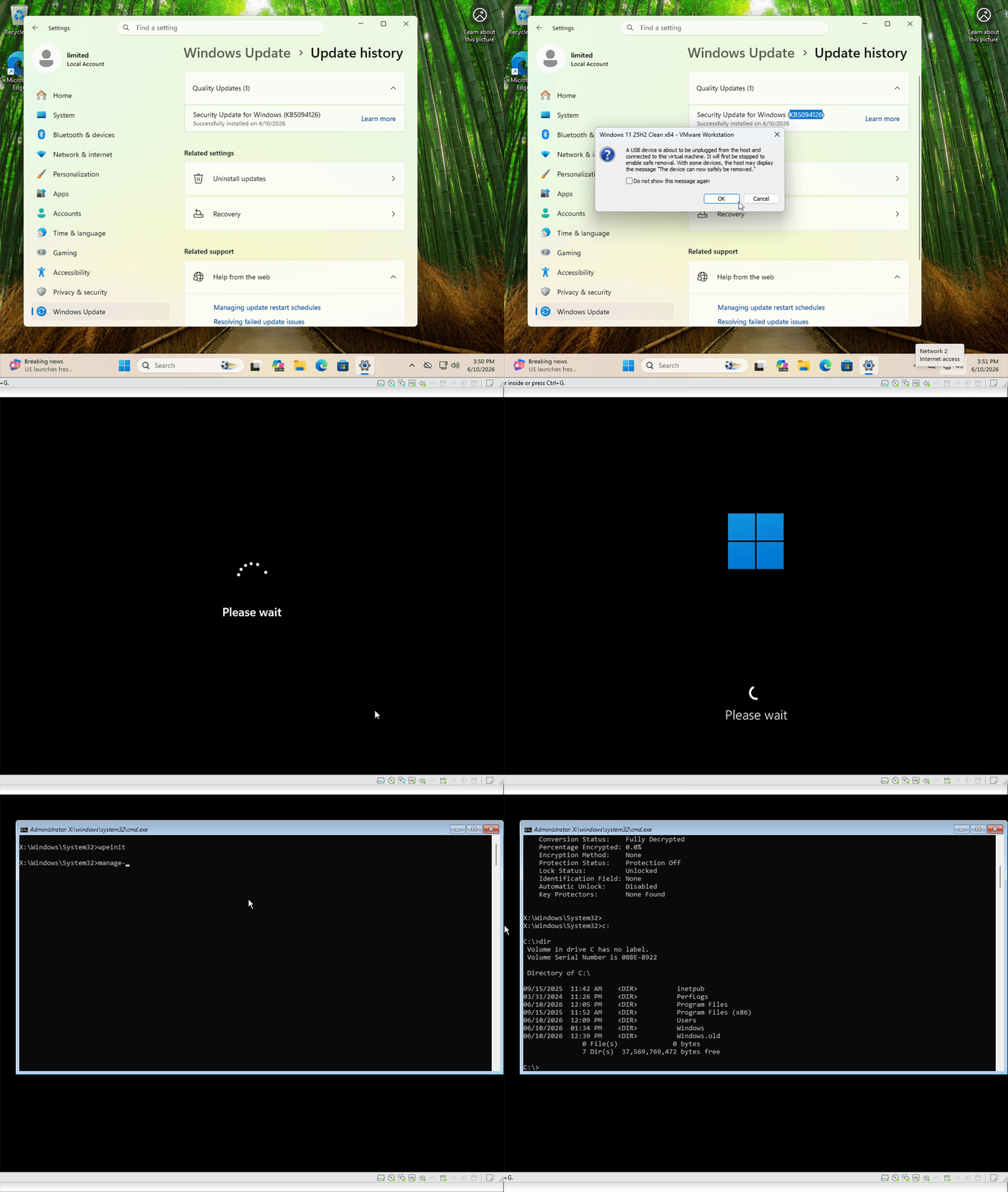
After connecting our crafted USB mass storage device and rebooting into WinRE, we get a command prompt with an unlocked disk. In other words, YellowKey still works on a system with June’s updates installed.
Bitskrieg and Win11 25H2 with June’s Updates Installed
Here is a screen recording of attempting bitskrieg against a Windows 11 25H2 system with KB5094126 (the June Windows update) installed.
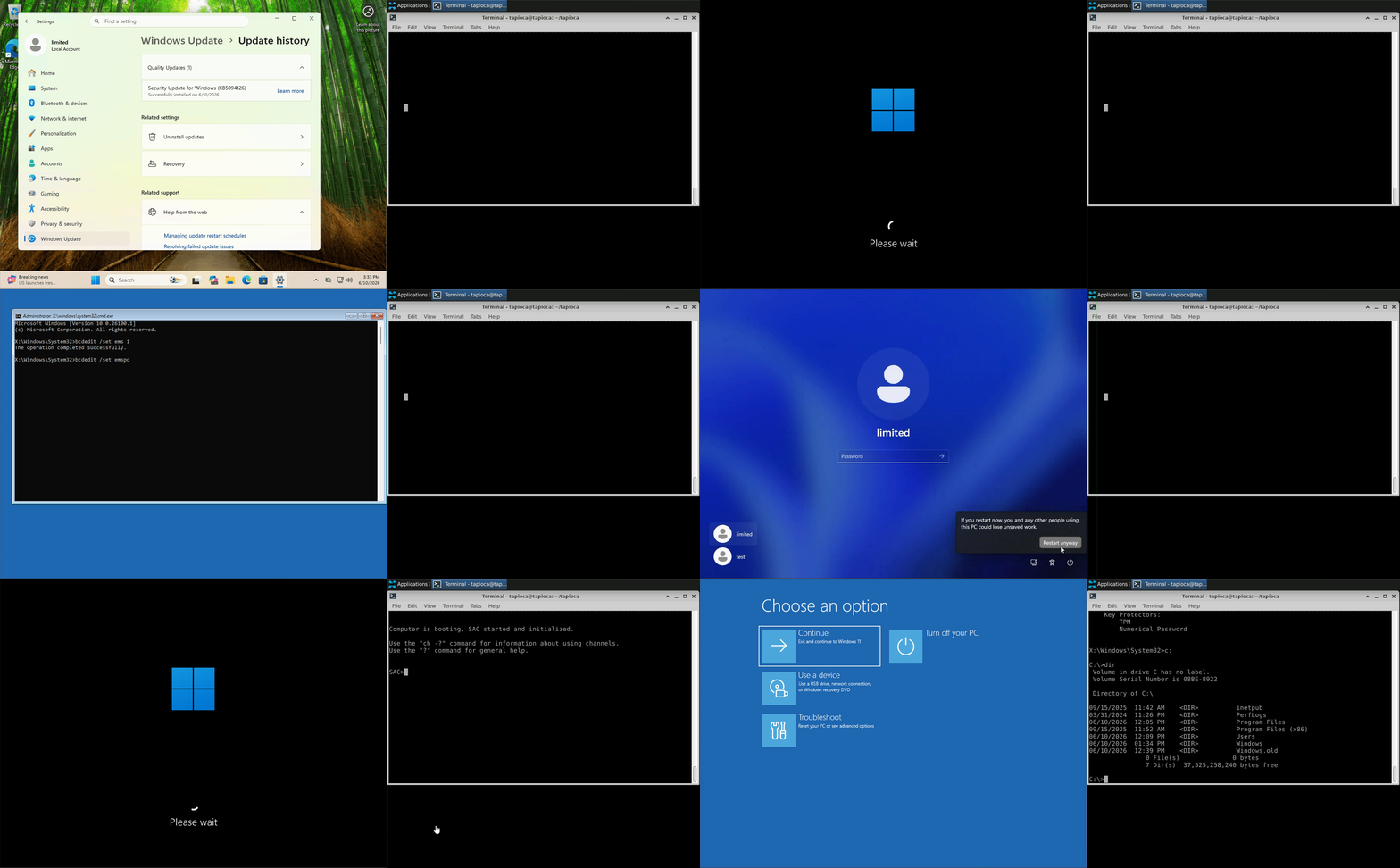
Despite the drive being encrypted with BitLocker, we are able to get to a command prompt, enable EMS, and then reboot once again. At this point, the serially-connected attacker’s system gets command prompt access to an unlocked drive. In other words, bitskrieg still works on a system with June’s updates installed.
Our hunch is that Microsoft designed the BitLocker bypass fixes with an assumption of a certain WinRE behavior. That is, if WinRE prompts to reboot before getting to a command prompt, then June’s updates will protect against YellowKey and bistkrieg. However, if you have a system that hasn’t installed all of the WinRE updates, you might have a system that will open a command prompt immediately upon clicking “skip this drive”, then your system may still be vulnerable to both YellowKey and bitskrieg even with June’s updates.
There is Hope
It is important to realize that the above tests showing YellowKey and bitskrieg still work on a system with June’s updates is perhaps not a scenario that is likely to be encountered in the real world. That is, it would be rare to see a Windows 11 25H2 system that is the RTM version installed from the ISO and has only the June cumulative updates installed. The more likely scenario is that Windows has received multiple updates through the months, and the way that a system gets to June’s patch level is a cumulative path through all of the updates that have been released and offered via Windows Update.
If we take our Windows 11 25H2 system and install all of the updates available, we get a different workflow. Specifically, at the point of clicking “Skip this drive”, we are not given a command prompt immediately, but rather a new screen that requires us to reboot again to get a command prompt.
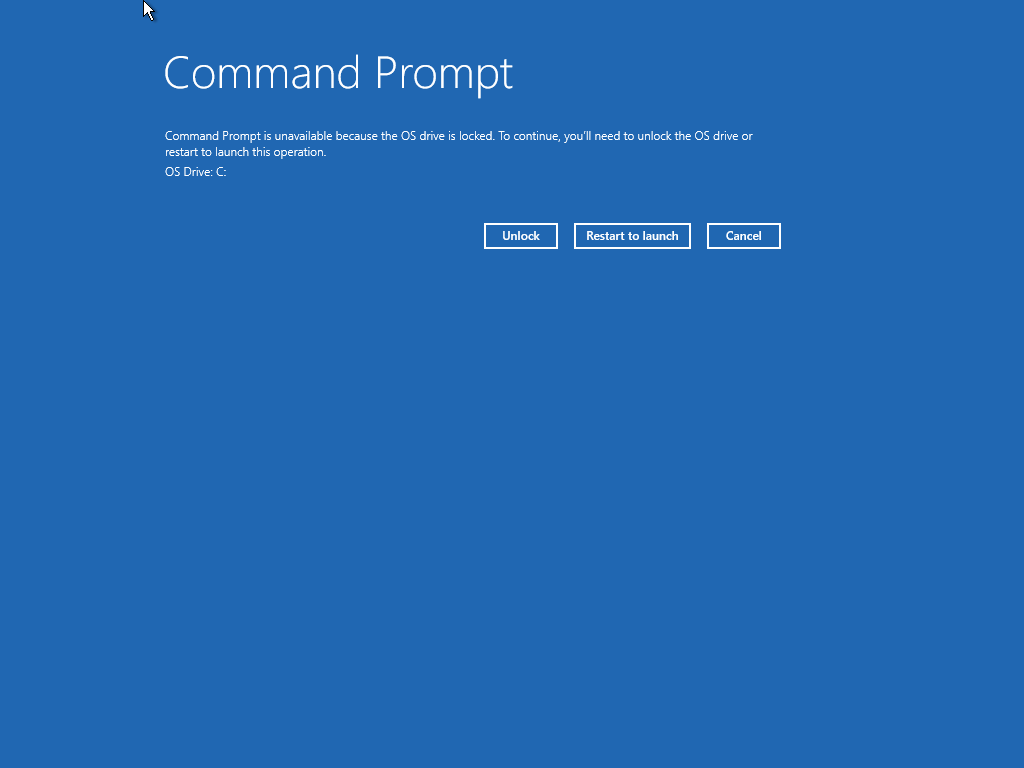
On such systems, if the June patch level is installed, YellowKey and bitskrieg fail.
One Caveat
If you have a system that has this “Restart to launch” screen to get to the Command Prompt, and we have June’s updates installed, we do appear to be protected against both YellowKey and bitskrieg. However, on such a system if we attempt to use the bitskrieg exploit, we will likely encounter a broken WinRE the next time we try to use it:
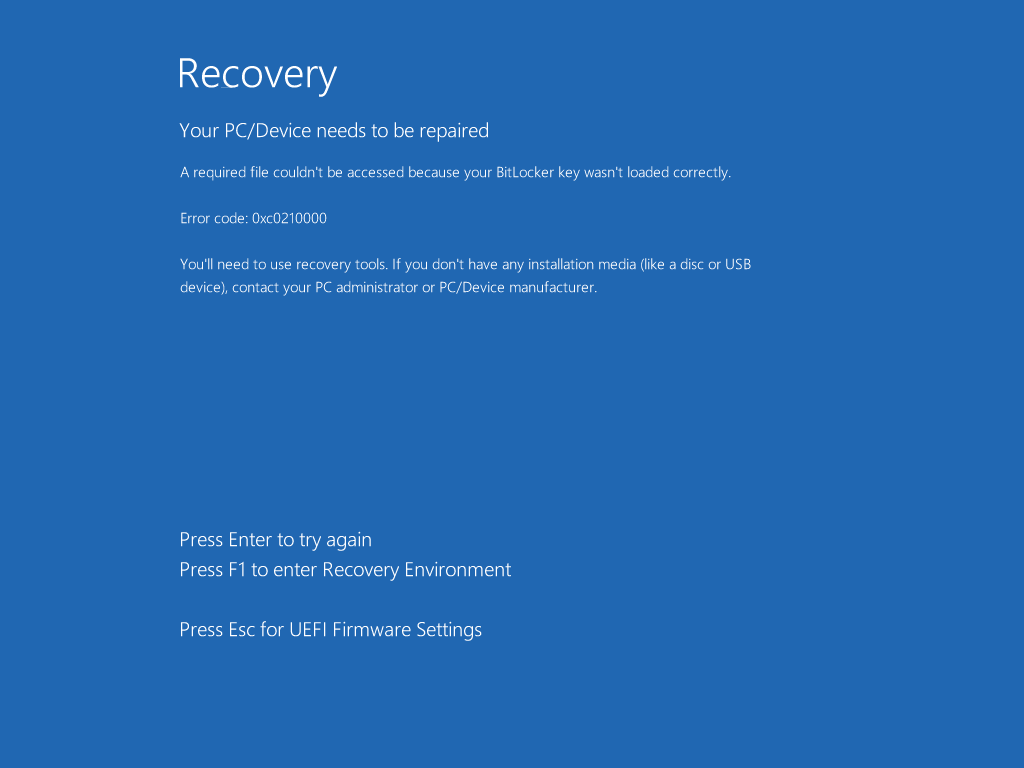
We can still boot into normal Windows, and we can fix WinRE from an elevated command prompt:
reagentc /disable
reagentc /enable
Conclusion
Ensuring that we are protected against known attacks requires accurate information about which software updates protect against which known things. Microsoft’s current “Patch Tuesday” workflow makes this very difficult. We shouldn’t need to guess, and we shouldn’t need to attempt to reproduce every exploit out there. Yet here we are.
We don’t know if Microsoft failed to fix YellowKey and bitskrieg for certain WinRE versions because we don’t know if Microsoft attempted to fix either of these exploits.
With respect to YellowKey and bitskrieg, systems that are fully up to date (including WinRE version) should be fine. It would be nice if the updates from Microsoft clearly indicated what they are supposed to be fixes for, especially in cases where there are known public exploits. But that would take somebody at Microsoft to recognize that their process needs to improve. Until then, we need to continue to be skeptical, and continue to not simply take a vendor’s word for things.